💬Get free consultation
Who can use this feature?
- Helpdesk is in early access. Request early access (opens in a new tab) and we turn it on for your store.
- Once Helpdesk is on for your store, it works on every plan
- You see Helpdesk when your role can view tickets
Ticket IDs
Each ticket gets an ID. You choose the prefix and the pattern.
What this is for
The ticket ID is the code you and the customer use for one request.
This helps you quote one ticket in email and find that same ticket again.
Ticket code is your prefix. Ticket ID format is the shape after the prefix. Only tickets created after you save use the new shape. Older tickets keep their ID.
Prefix plus code avoids look-alike characters. Use that shape when your team reads IDs out loud to customers.
How to set the ticket ID
- In Helpdesk, open settings, then open Tickets.
- Edit Ticket code. Use a short prefix for your store.
- Select Prefix + date + code, or another pattern in the list.
Expected result: Tickets created after you save use the new prefix and pattern.
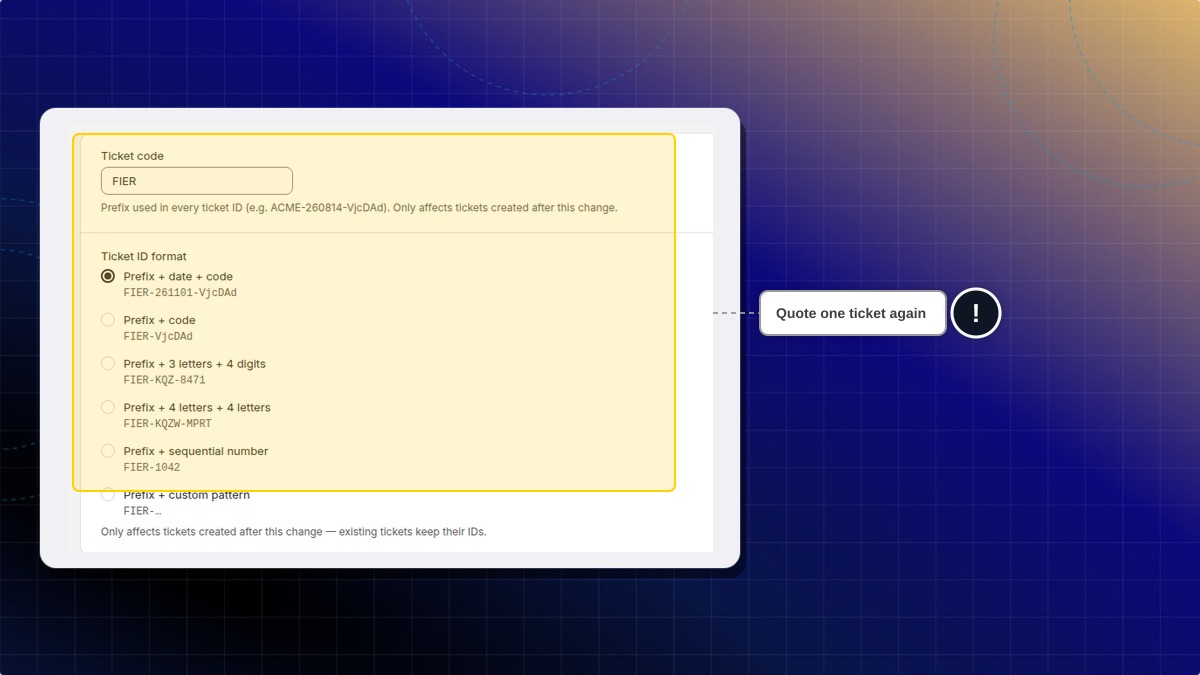
| Pattern | Shape |
|---|---|
| Prefix + code | Prefix, then a short code |
| Prefix + 3 letters + 4 digits | Prefix, three letters, four digits |
| Prefix + 4 letters + 4 letters | Prefix, four letters, four letters |
| Prefix + sequential number | Prefix, then the next number |
| Prefix + custom pattern | A pattern you type |
Do old tickets change ID?
No. Only tickets created after the change use the new prefix and pattern.
 Chatty Help Center