💬Get free consultation
Who can use this feature?
- Helpdesk is in early access. Request early access (opens in a new tab) and we turn it on for your store.
- Once Helpdesk is on for your store, it works on every plan
- You see Helpdesk when your role can view tickets
Export
Download tickets and messages. The file includes customer personal data. Store it under your own data policy.
What this is for
Export builds a file of tickets, messages, or both.
This helps you keep a copy for your own records, or hand a date range to someone outside Helpdesk.
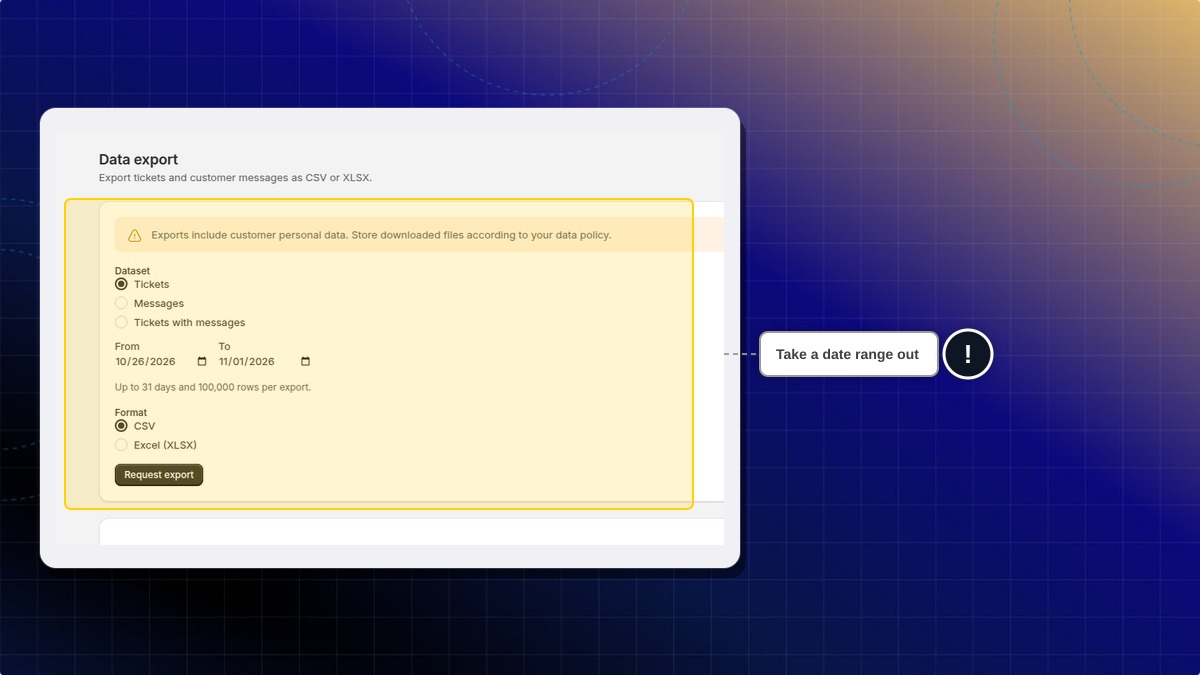
One request covers up to 31 days and 100,000 rows. The file includes customer personal data. Store it under your own data policy.
The list on the page stays empty until a request finishes.
How to export tickets
- In Helpdesk, open settings, then open Data export.
- Pick a dataset: Tickets, Messages, or Tickets with messages.
- Set From and To. One export covers up to 31 days and 100,000 rows.
- Choose CSV, or choose Excel (XLSX).
- Click Request export.
Expected result: The request appears in the list on this page when it is ready.
Why is the list empty?
No export has been requested yet. A finished file shows up in that list.
 Chatty Help Center