Who can use this feature?
- Helpdesk is in early access. Request early access (opens in a new tab) and we turn it on for your store.
- Once Helpdesk is on for your store, it works on every plan
- You see Helpdesk when your role can view tickets
Reports
Send your Manager agent's daily and weekly reports to Slack.
What this is for
A report is a note the Manager agent sends to Slack on a schedule.
This helps you see volume, speed, and AI quality in Slack without opening Helpdesk.
The form opens on Weekly. Only Slack can send today. Save stays unavailable until Slack is connected and a person or channel is chosen.
Until a Manager agent exists, the page asks you to create one. A Draft Manager is enough to open the form. It does not have to be live.
How to add a report
- In Helpdesk, open settings, then open Reports.
- Click Add report. If the page still asks for a Manager agent, create one first. See Agents.
- Set Frequency. The form opens on Weekly.
- Leave Channel on Slack. Only Slack can send today.
- Under Send to, choose a DM or a channel. Connect Slack from Integrations before you can pick a person.
Expected result: The form lists what the report includes. Save stays unavailable until Slack is connected and a recipient is chosen. This store had no Slack connection, so the report was not saved.
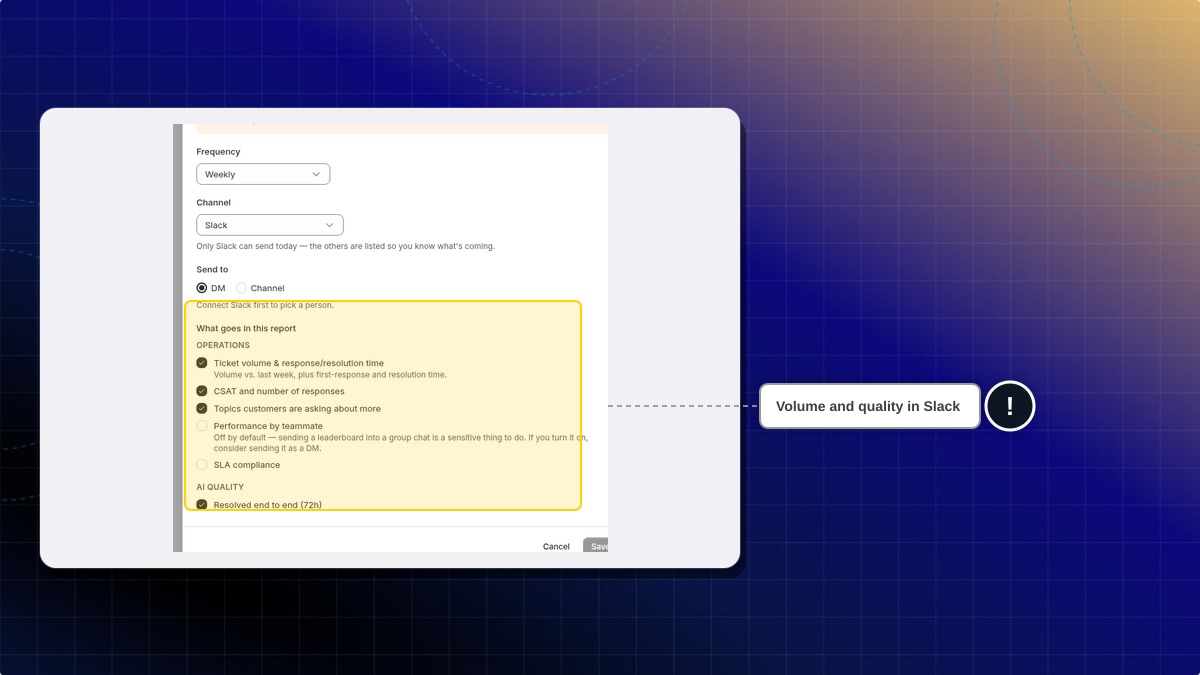
The sections on the form start with ticket volume and response time, CSAT and number of responses, topics customers are asking about more, performance by teammate, SLA compliance, and resolved end to end (72h). Performance by teammate and SLA compliance start off.
Can I add a report with no agent?
No. Until a Manager agent exists, the page asks you to create one. A Draft Manager is enough to open the form.
 Chatty Help Center