AI product page
Who can use this feature?
- This feature is available for Pro & Plus plan users.
What is AI product page
AI product page is an inline AI assistant that appears directly on your product pages, including:
- A text box where customers type a question
- Auto-generated questions relevant to the product
Customers ask from the product page. Your chatbox opens with their question, and AI answers there. They never leave the product page.
How does AI product page help
When customers have questions about a product, they don't need to open a new page. Simply click and ask AI.
This helps customers make faster purchase decisions by:
- Seeing AI-suggested questions based on the current product
- Getting immediate answers to product-specific questions
- Staying focused on the product without page interruptions
How does AI product page work
When customers view a product page with AI product page:
- AI reads the product's title, description, product type, vendor, variants, and options
- The first time a shopper sees the block, AI writes up to 10 questions about the product. Chatty saves them for later visits.
- Customers see 3 or 4 of these questions, picked at random, under the text box
- Customers can either select a suggested question or type their own
- Your chatbox opens with the question, and AI answers there using the current product's context
How to set up AI product page
Before you start
Make sure that you've completed these steps:
- Turn on the Chatty app embed in your theme. The block opens your chatbox to answer, so it doesn't work while the app embed is off. See Embed the app in your theme.
- Enable live chat
- Activate AI assistant
- Sync product information to AI training data
- Add other training data about your store & products
AI product page is not supported on headless storefronts yet.
Go to AI agent
Go to Settings
In the Embed product AI agent section, turn on AI product assistant & click Save
Click Go to theme
Check the AI product assistant block in the theme editor
The theme editor opens with the block already added to your product information. Drag it in the left panel to move it. This block only works on product pages.
Customize the block
Turn off Show suggested questions if you want only the text box.
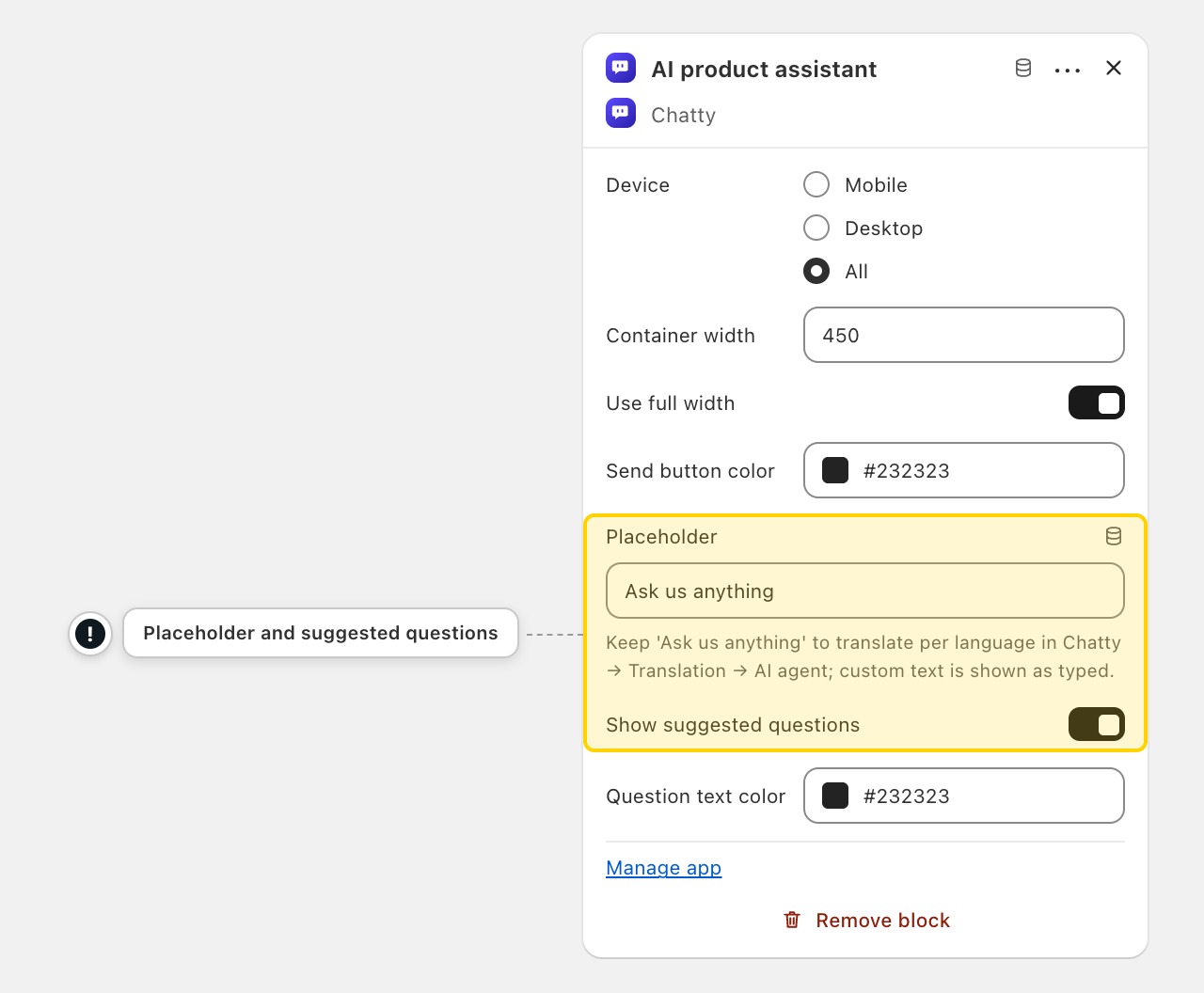
Keep Placeholder as "Ask us anything" if you want it translated into each language. Text you type there yourself shows as written in every language.
Click Save
When you update product information, the questions will not be auto-updated with new data. Contact us for the latest updates.
Will this work if AI assistant is not activated?
No, you need to activate AI assistant first. The block sends questions to your AI agent, which uses the same data sources and settings.
Can I customize the suggested questions?
The questions are automatically generated by AI for each product. To influence the questions, improve your product descriptions and add detailed information about features customers care about.
Questions already saved don't change when you edit the product. Contact us to refresh them.
Can I translate the "Ask us anything" placeholder?
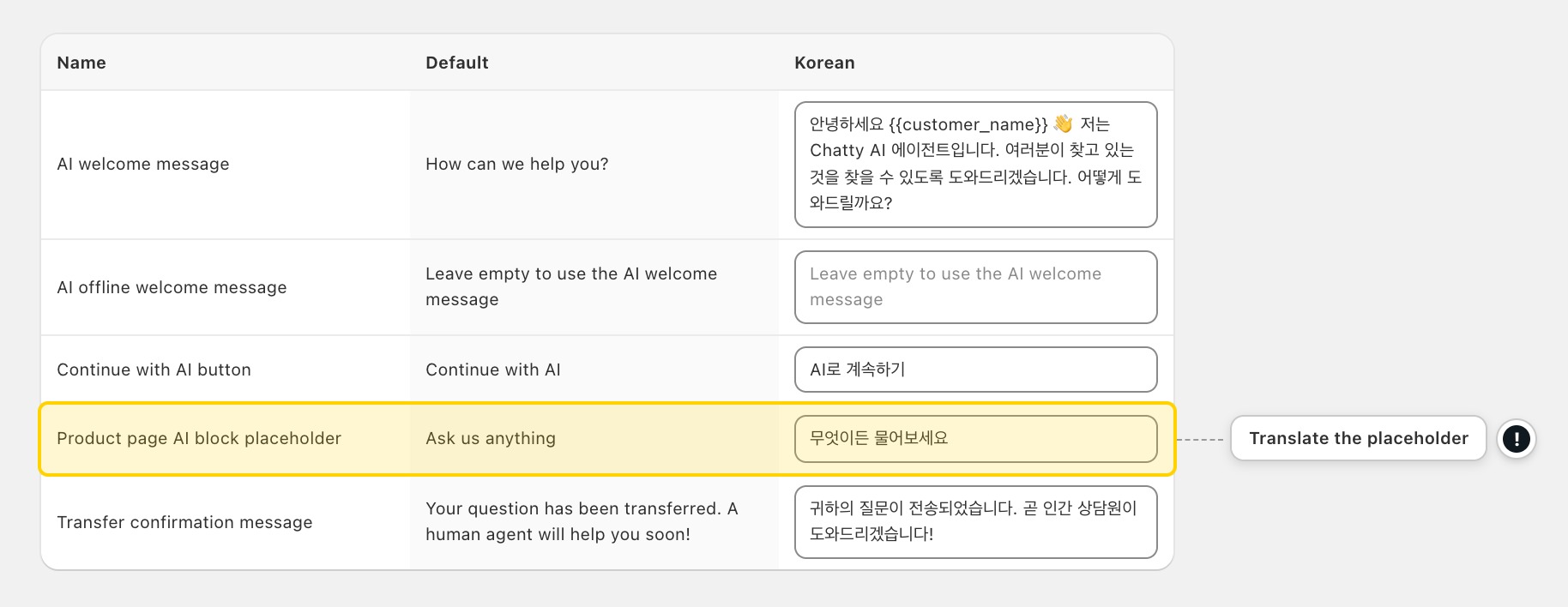
Yes. Chatty translates it into each published language for you. To change a translation:
-
Go to Settings → More views → Translations.
-
Click a published language, for example Korean.
-
Click AI agent.
-
Type your text in Product page AI block placeholder, for example "Ask about sizing or materials".
-
Click Save.
Expected result: Shoppers see the placeholder in the language of the page they are browsing. If that language has no Chatty translation, they see your default language.
This works only while Placeholder in the theme editor is "Ask us anything" or empty.
Suggested questions are translated too, using your product's own title and type in that language.
Does this replace the main chatbox?
No, this works alongside your main chatbox. When a customer asks a question in the block, your main chatbox opens and AI answers there. The suggested questions in the block are about the current product.
 Chatty Help Center