💬Get free consultation
Who can use this feature?
- Helpdesk is in early access. Request early access (opens in a new tab) and we turn it on for your store.
- Once Helpdesk is on for your store, it works on every plan
- You see Helpdesk when your role can view tickets
Contacts
Contacts are the people who have written to Helpdesk.
What this is for
A contact is a person who already wrote in, by ticket or by chat.
This helps you see their orders, what they have spent, and how many tickets they have, before you answer the next one.
The list does not include shoppers who never wrote in.
How to find a contact
- In Helpdesk, click Contacts.
- Use Search contacts.
- Open a row to see that person.
Expected result: The table lists each contact.
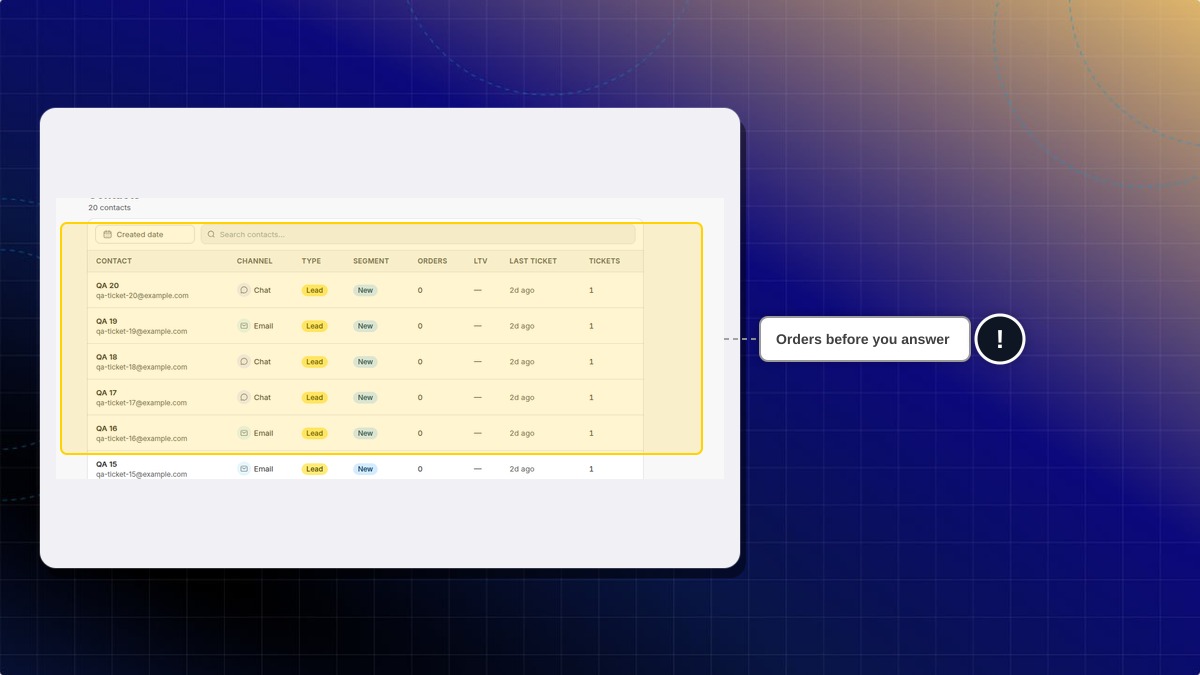
| Column | What it shows |
|---|---|
| Contact | Name and email |
| Channel | Where they wrote from, such as Email or Chat |
| Type | Lead or another type on the row |
| Segment | The segment name |
| Orders | Order count |
| LTV | Lifetime value |
| Last ticket | When the last ticket was |
| Tickets | How many tickets they have |
Why is the list short?
It only lists people who already have a ticket or a chat. A new store starts empty.
 Chatty Help Center