Who can use this feature?
- Helpdesk is in early access. Request early access (opens in a new tab) and we turn it on for your store.
- Once Helpdesk is on for your store, it works on every plan
- You see Helpdesk when your role can view tickets
Assignment
Choose who receives a ticket when no routing rule assigns an agent or a team.
What this is for
Assignment decides who owns a ticket when you are not picking a person on that ticket.
This helps you keep new tickets from sitting with nobody, and keep one agent from holding too many.
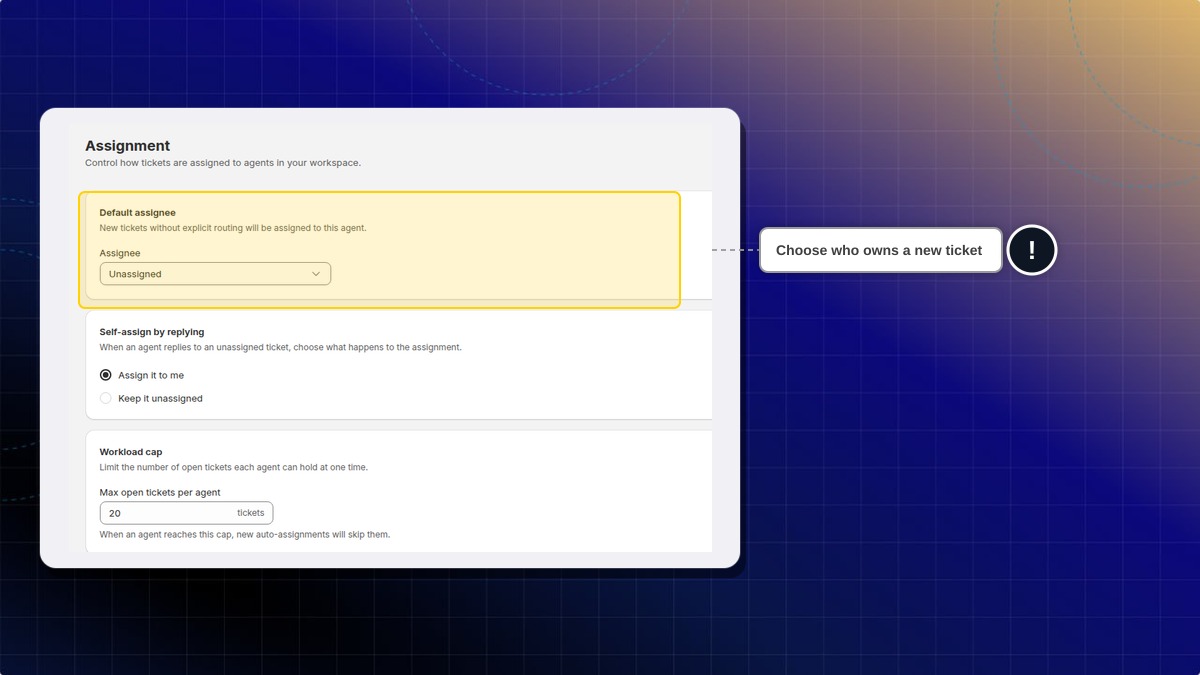
Default assignee receives a new ticket when no routing rule assigns an agent or a team. Chatty skips this when that agent is at the workload cap.
Self-assign by replying decides whether your own reply makes you the owner. Assign it to me takes the ticket. Keep it unassigned means your reply does not make you the owner.
Max open tickets per agent counts each agent's Open and Pending tickets. At that number, the default assignee and self-assign by replying skip the agent. Routing rules can still assign that agent. This helps you spread the queue.
Unassign on customer reply clears the owner when the customer writes again and that agent is offline or in away mode. This lets an online teammate take it.
Reassign unsnoozed conversations returns a waking ticket to the queue when that owner is already at the cap.
How to set the default assignee
- In Helpdesk, open settings, then open Assignment.
- Under Default assignee, open Assignee.
- Pick an agent, or leave it Unassigned.
- Click Save on the Unsaved changes bar.
Expected result: Chatty shows "Settings saved." A new ticket with no routing rule uses that assignee.
How to assign when someone replies
- On the same page, find Self-assign by replying.
- Choose Assign it to me or Keep it unassigned.
- Click Save on the Unsaved changes bar.
Expected result: Chatty shows "Settings saved." The next reply on an unassigned ticket follows that choice.
How to assign one ticket
- Open the ticket.
- Click Assign.
- Pick the agent.
Expected result: That agent owns the ticket.
| Control | What it does |
|---|---|
| Max open tickets per agent | Default assignee and self-assign skip an agent who holds that many Open or Pending tickets |
| Unassign on customer reply | Remove the agent when the customer writes again and that agent is offline or away |
| Reassign unsnoozed conversations | When a snoozed ticket wakes and the agent is at the cap, return it to the queue |
Does a routing rule beat the default assignee?
Yes. The default applies when no rule assigns the ticket.
 Chatty Help Center