Widget Display Rules
What are Widget Display Rules?
Widget Display Rules enable you to manage which store pages display or conceal the Chatty chat widget. You can employ simple wildcards or comprehensive regular expressions to match multiple pages simultaneously without enumerating each URL individually.
This proves beneficial when you need to:
- Hide the widget on all policy or legal pages (e.g.
/pages/terms,/pages/privacy) - Show the widget only on product and collection pages
- Target a group of URLs that share a common pattern
Where to find it
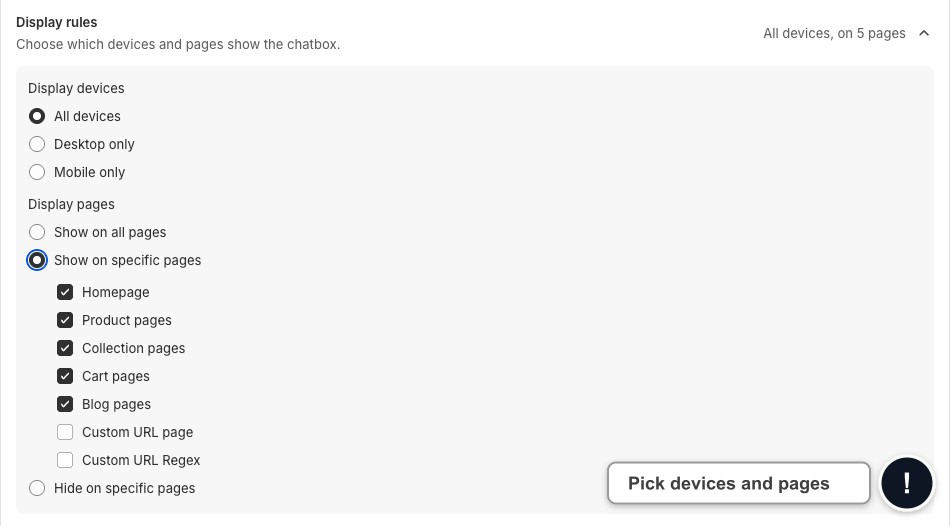
Go to Chatbox. In the Shared chatbox settings card, click Display rules.
How it works
Display devices sets where the widget shows: All devices, Desktop only or Mobile only.
Display pages has three options:
- Show on all pages: the widget appears on every page
- Show on specific pages: the widget only appears on pages that match
- Hide on specific pages: the widget appears everywhere except pages that match
When you pick specific pages, tick the page types: Homepage, Product pages, Collection pages, Cart pages or Blog pages. Tick Custom URL page to list exact paths, one per line, for example /pages/contact. Tick Custom URL Regex to enter your own URL patterns.
Writing patterns
Enter one pattern per line using:
| Pattern type | Example | What it matches |
|---|---|---|
| Wildcard | /pages/* | All URLs that start with /pages/ |
| Full regex | /^\/pages(\/.*)?$/ | /pages and any sub-path under /pages/ |
| Exact path | /contact | Only the /contact page |
Limits:
- Maximum 50 patterns
- Maximum 200 characters per pattern
Inline validation
Incorrect pattern formats trigger error messages below the input field. Patterns must be corrected before saving — settings won't save with invalid patterns present.
Examples
Hide widget on all /pages/ URLs:
/pages/*Hide widget on terms, privacy, and refund pages only:
/pages/terms
/pages/privacy-policy
/pages/refund-policy
Show widget only on product pages (regex):
/^\/products(\/.*)?$/Wildcards use * to match any characters. Full regex patterns must start and end with / and follow standard JavaScript regex syntax.
 Chatty Help Center